Author: Xadreque Ussivane
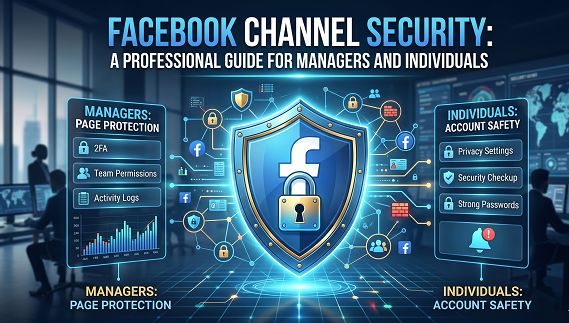
Protect your digital presence with enterprise-grade strategies against evolving cyber threats
The New Reality of Facebook Security
In 2026, Facebook remains one of the most powerful platforms for business marketing and personal branding—but with great power comes significant vulnerability. Cybercriminals are no longer simple opportunists; they operate sophisticated schemes targeting both managers and individual users. The AccountDumpling phishing operation alone compromised approximately 30,000 Facebook Business accounts in 2026, using legitimate tools like Google AppSheet and Canva to bypass security filters
The stakes have never been higher. A compromised account isn’t just an inconvenience—it represents financial loss, reputational damage, and potential legal consequences. Whether you manage a corporate page or protect your personal digital identity, understanding professional-grade security measures is essential.
Understanding the Threat Landscape
The Architecture Problem: Why Facebook Is Vulnerable
Unlike enterprise platforms like Google Workspace or Microsoft 365, Facebook was never designed with corporate governance in mind . There’s no concept of a centralized, company-owned account—everything hinges on personal profiles granted permissions through Business Manager. This creates systemic risk:
– Single point of failure: If an individual admin’s account is hacked, your entire page is compromised
– Recovery challenges: Meta’s support infrastructure is largely automated; recovery can take weeks
– Lax permission structures: Roles lack nuance, offering too much power too easily
Current Attack Vectors
1. Sophisticated Phishing Campaigns
Scammers now exploit legitimate services like Google AppSheet to send convincing emails from `noreply@appsheet.com`, claiming copyright violations or policy breaches. These bypass traditional spam filters and exploit psychological triggers—fear of account deletion, desire for verification badges .
2. Account Takeover Vulnerabilities
Meta recently patched a critical vulnerability that could allow attackers to gain unauthorized access through recovery flows without knowing passwords . This highlights how even platform-level flaws can compromise your security.
3. Follow-Up Scams
Some hackers return access voluntarily only to later pose as Meta support, offering “protection services” for payment . Trustworthy platforms never ask for money this way.
Professional Security Protocols
Phase 1: Foundation—Secure Your Infrastructure
1.1 Establish a Secure Business Manager Base
– Create a dedicated Business Manager account for your organization
– Assign **at least two full-time employees** as Business Admins—never just one
– Use generic, permanent company email addresses (e.g., `facebook-admin@seudominio.com`) for key admins
– Remove direct Page roles from personal profiles; assign users exclusively through Business Manager
1.2 Enforce Universal Two-Factor Authentication (2FA)
– Make 2FA mandatory for **everyone** accessing your Meta Business account
– Prioritize authentication apps (Google Authenticator, Microsoft Authenticator) over SMS—SMS codes can be intercepted through SIM swapping
– For high-security environments, implement physical security keys (YubiKey)
– Avoid using personal mobile phone numbers for corporate 2FA
> Professional Insight: SMS-based 2FA is better than nothing, but authentication apps provide superior protection against real-time phishing attacks that steal codes .
1.3 Implement Role-Based Access Control
Use Meta’s role hierarchy strategically:
– Business Admin: Only for essential personnel
– Finance roles: For billing management
– Page Editor/Analyst: For day-to-day marketers
– Ad Account roles: Separate ad buyers from analysts
Phase 2: Maintenance—Ongoing Protection
2.1 Regular Security Audits
Monthly Checklist:
– Review active sessions under Security & Login > “Where You’re Logged In”
– Terminate unknown devices immediately
– Audit connected apps and remove unused integrations
– Review admin permissions and remove inactive users (especially those inactive for 90+ days)
Quarterly Review:
– Re-evaluate all admin roles and permissions
– Remove users without 2FA enabled
– Review and remove inactive ad accounts (hackers target dormant accounts)
2.2 Privacy Checkup and Information Control
– Use Facebook’s Privacy Checkup tool (Settings > Privacy) to audit exposed personal information
– Limit email/phone visibility to “Only Me”
– Enable login alerts for unrecognized device access attempts
2.3 Email Verification Protocol
Establish a strict rule: Any notification about blocking, appeals, or verification must be verified through the Facebook Business interface, not through email links .
Official Meta Domains:
– Emails come only from: `@fb.com`, `@facebook.com`, `@facebookmail.com`, `@support.facebook.com`
– Meta never sends official notifications via direct messages
Phase 3: Incident Response—When Things Go Wrong
3.1 Immediate Action Protocol
If you suspect compromise:
1. Initiate recovery via Facebook’s official process at `facebook.com/hacked`—not through third-party links
2. Change password and update in all password managers
3. Review and remove unknown admins and partners in Business Settings
4. Analyze ad campaign history and transactions
5. Check for unknown apps or integrations
3.2 Recovery Best Practices
– Document everything: Log all suspicious activity for potential legal action
– Warn followers: Use backup communication channels (email list, other social platforms)
– Report suspicious activity to Facebook using their official help channels
– Be concise in reports: Your request may be reviewed by AI; stick to requested formats
3.3 The “Zero Trust” Mindset
Treat every message claiming to be from Meta with skepticism, regardless of how professional it appears. Verify all requests through the official Facebook interface before taking action .
GRUPO
Av. de Moçambique
Maputo – Moçambique
● Nuvem Privada Segura
● Backup on-line
● Notícias
● Análises
● Guias
● Tutoriais
● Sobre nós
● Newsletter
● Estudos de caso
● Política de Privacidade
● Termos e Condições
Páginas acessibeis:
. Webinars
. Workshops
. Serviços
. Contace-nos
Instituição:
Lorem ipsum dolor sit amet, consectetur adipiscing elit. Ut elit tellus, luctus nec ullamcorper mattis, pulvinar dapibus leo.
Siganos:
© INCOMUNET, 2025. All Rights Reserved.